
Frequently Bought Together SDK
The Frequently Bought Together SDK lets a merchant who renders recommendations with their own markup still get conversions attributed to the app. It is a small storefront script (sdk.min.js , version 1.0.0) for themes that call the recommendations public API and build the widget themselves instead of using ours.
It does two jobs, exactly as our widget does:
- Adds products to the cart through Shopify's
/cart/add.js, tagging the cart so the sale can be attributed to the app. - Records stats (rendered, viewed, clicked, added) against the app's stats service, so the merchant's dashboard shows the custom widget's performance.
Without the SDK, a custom widget can show our recommendations, but nothing it sells is credited to the app.
Loading the SDK
Add one script tag to the theme, ideally with defer , on every page where the custom widget appears.
<script src="https://cdn.codeblackbelt.com/widgets/frequently-bought-together/sdk.min.js" defer></script>
Once it runs, the SDK:
- Exposes the API as
window.codeblackbelt.fbt(fbt.versionreturns'1.0.0'). - Schedules the cart check described under How attribution works.
- Dispatches
codeblackbelt:frequently-bought-together:sdk-readyondocument.
The event is dispatched once, synchronously, when the script executes. A listener registered after that moment never fires, so check for the global first:
function onFbtReady(callback) {
  const fbt = window.codeblackbelt && window.codeblackbelt.fbt;
  if (fbt) {
    callback(fbt);
  } else {
    document.addEventListener('codeblackbelt:frequently-bought-together:sdk-ready', () => callback(window.codeblackbelt.fbt), { once: true });
  }
}
Loading it twice is harmless. A second copy of the script returns immediately: it does not replace the global and does not fire the ready event again.
Updates are automatic. The SDK URL has no version parameter and is cached for at most 1 hour, so new releases reach the store within an hour with no change to the theme.
Quick start
A complete integration calls four methods: rendered when the widget is drawn, viewed when it is seen, clicked on product links and add to cart on the button.
<script src="https://cdn.codeblackbelt.com/widgets/frequently-bought-together/sdk.min.js" defer></script>
<script>
document.addEventListener('codeblackbelt:frequently-bought-together:sdk-ready', () => {
const fbt = window.codeblackbelt.fbt;
const widget = document.querySelector('#my-fbt');
const recommendations = widget.querySelectorAll('[data-product-id]');
// 1. The widget has been drawn
fbt.trackRendered(recommendations.length);
// 2. Recorded once the whole widget is inside the viewport
fbt.trackViewed(widget, recommendations.length);
// 3. A click on a recommended product link
widget.querySelectorAll('a.fbt-product-link').forEach((link) => {
link.addEventListener('click', (event) => {
event.preventDefault();
fbt.trackClick(link.dataset.productId).then(() => window.location.href = link.href);
});
});
// 4. The bundle's add to cart button
widget.querySelector('.fbt-add-to-cart').addEventListener('click', () => {
fbt.addToCart({
items: [
{ productId: 123, variantId: 456 },
{ productId: 'gid://shopify/Product/789', variantId: 'gid://shopify/ProductVariant/1011', quantity: 2 }
],
trackLineItem: true
})
.then(() => window.location.href = '/cart')
.catch((error) => alert(error.message));
});
});
The inline script registers its listener before the deferred SDK runs, so the ready event is never missed here. Markup, selectors and data attributes are the merchant's own; the SDK makes no assumptions about them.
API reference
All methods live on window.codeblackbelt.fbt . The two that write to the cart return promises that resolve only after tracking is saved, so navigating in .then() never loses a stat.
| Method | Records | Returns | Invalid input |
|---|---|---|---|
addToCart({ items, trackLineItem }) |
directlyAdded stat + added cart attribute |
Promise with the /cart/add.js response |
Rejected promise |
trackRendered(count) |
rendered stat |
Nothing | Throws TypeError |
trackViewed(element, count) |
viewed stat, once visible |
Nothing | Throws TypeError |
trackClick(productId) |
clicked stat + clicked cart attribute |
Promise, resolves with no value | Throws TypeError |
addToCart({ items, trackLineItem })
Adds one or more variants in a single /cart/add.js request, then records the conversion.
- Validates
items(see Item format). An invalid item rejects the promise before any request is sent. - Posts all items in one request. The list is reversed before sending, because Shopify shows the last added line first; the cart therefore displays them in the order given.
- If Shopify answers with an error, the promise rejects with an
Errorwhosemessageis Shopify'sdescription(for example, a stock limit message), ready to show to the shopper. An empty response is also treated as an error. - On success, it records the products as directly added: it sends the
directlyAddedstat, appends the product IDs to the cart attribute and dispatchescodeblackbelt:frequently-bought-together:added. - Resolves with Shopify's
/cart/add.jsresponse once both tracking requests finish.
Tracking never makes the promise reject. If the stats service or /cart/update.js fails, the products are already in the cart and the promise still resolves. When trackLineItem is true , each line also gets the private property __Added with Frequently Bought Together button , the same one our widget adds. The double underscore hides it from the checkout and most cart templates.
trackRendered(count)
Sends the rendered stat with count as the number of recommendations shown. Call it once per render: every call sends a new stat. It does not wait for the request and returns nothing.
trackViewed(element, count)
Watches element with an IntersectionObserver and sends the viewed stat the first time it is fully inside the viewport (threshold 1.0). After that it stops observing. Each call creates its own observer, so call it once per widget.
trackClick(productId)
Records a click on a recommended product. It saves the product in the clicked cart attribute and in local storage, then sends the clicked stat. If the shopper later adds that product from the theme's own buttons, it is counted as added (see How attribution works). The promise resolves once both are saved, even if a request failed, so it is safe to navigate in .then() .
Events
Event (on document ) |
When | event.detail |
|---|---|---|
codeblackbelt:frequently-bought-together:sdk-ready |
The SDK has loaded | None |
codeblackbelt:frequently-bought-together:added |
addToCart succeeded |
productIdList , variantIdList , productId , variantId , quantity |
The added event is the same one our widget fires, so existing listeners keep working. Its productId and variantId are the first item's, and quantity is the number of items, not the sum of their quantities.
Item format and validation
Every value is validated and normalised before anything is sent, and an invalid one fails fast with a descriptive message such as Invalid variantId: abc .
| Field | Required | Accepted values | Sent to Shopify as |
|---|---|---|---|
productId |
Yes | Positive integer, numeric string or GID (gid://shopify/Product/123 ) |
Not sent; used for tracking only |
variantId |
Yes | Same as productId (gid://shopify/ProductVariant/456 ) |
id |
quantity |
No, defaults to 1 | Integer greater than 0 | quantity |
properties |
No | Plain object | properties , merged with the tracking property |
sellingPlan |
No | Same as productId |
selling_plan |
IDs from the Storefront or Admin GraphQL APIs can be passed as GIDs without parsing; the SDK keeps only the numeric part. productId must be the variant's own product, because it is the ID used to attribute the sale.
Other arguments:
itemsmust be a non-empty array. An empty array rejects withPlease, provide at least one item to be added to the shopping cart.count(trackRendered,trackViewed) accepts any finite number or numeric string. It is rounded and clamped to 1–100, the range the stats accept, so0is recorded as 1 and250as 100. Anything non-finite throws.element(trackViewed) must be a DOMElement; a selector string or a jQuery object throws.
Errors surface differently by method. addToCart never throws: invalid input and Shopify errors both reject the promise. trackRendered , trackViewed and trackClick throw the TypeError synchronously, so wrap them in try /catch if the input is not trusted.
How attribution works
A sale counts for the app when its product IDs are in the cart attributes the app reads when the order is placed. The SDK writes them on both paths a shopper can take: buying from the custom widget, or clicking a recommendation and buying it later from the theme.
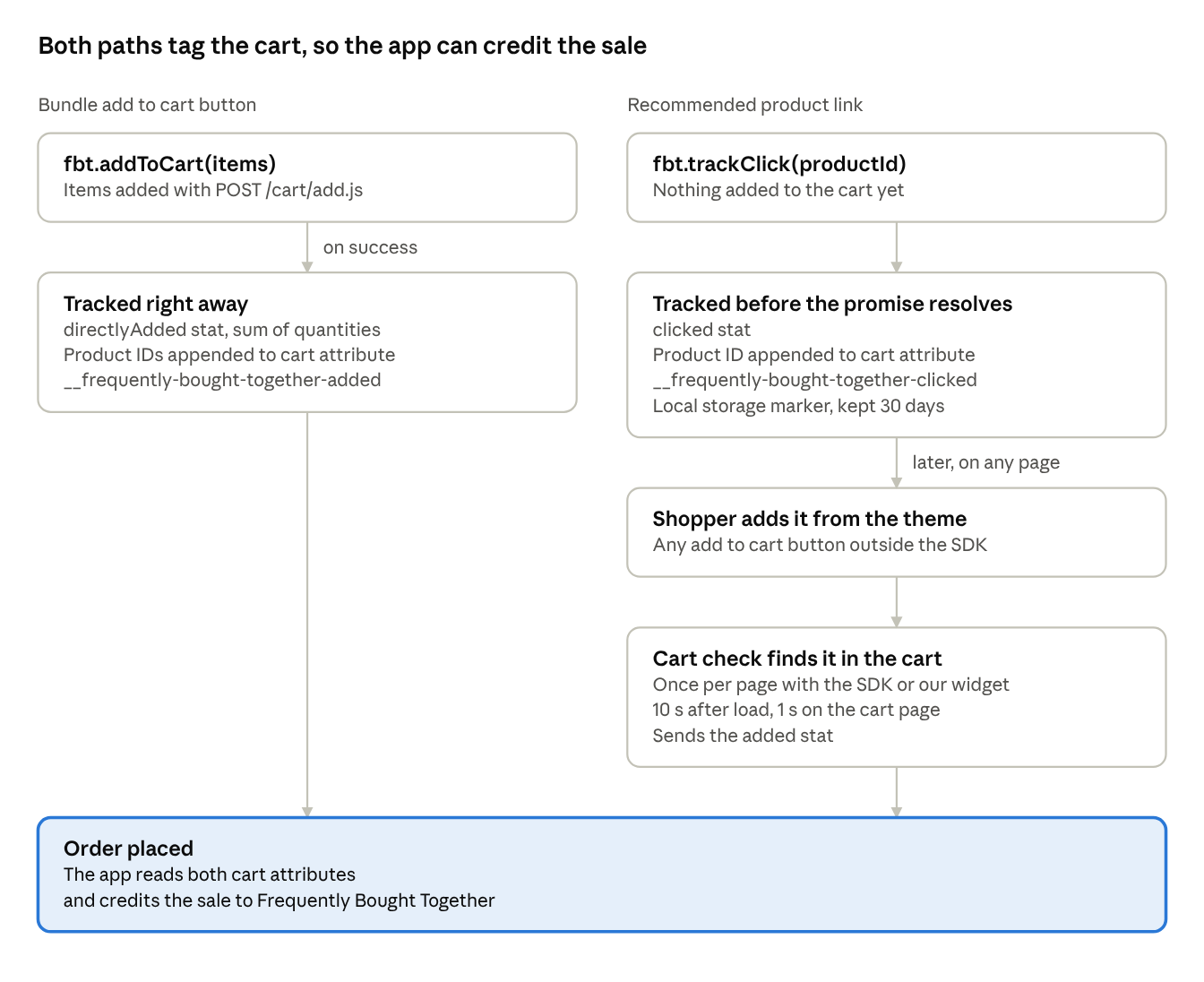
The left path is attributed immediately. addToCart sends the directlyAdded stat and writes the cart attribute in the same call, because the next pages (cart, checkout) may load neither the SDK nor our widget.
The right path is attributed later. trackClick stores the product ID; when the shopper adds that product with any theme button, a later cart check sends the added stat. A product added through addToCart has its click marker removed, so it is never counted twice.
The cart check is scheduled when the SDK loads, so clicks convert into added stats even on stores that don't load our widget. When the widget and the SDK are both on the page, the check still runs only once. The attributes are private (__ prefix), keyed to the shopper's cart token and kept in local storage for up to 30 days, so earlier products are kept when new ones are added.
Best practices and gotchas
- Navigate only after the promise resolves. Redirecting to
/cartor a product page beforeaddToCartortrackClicksettles can cancel the tracking requests. - Load the SDK on every page with the custom widget, and ideally site-wide. The deferred cart check only runs on pages where the SDK or our widget is loaded.
- Pass a compact element to
trackViewed. It fires only when the whole element fits in the viewport, so a container taller than a phone screen is never counted as viewed. Use the recommendations row, not the whole section. - Do not call
trackRenderedfor an empty widget. The count is clamped to a minimum of 1, sotrackRendered(0)still records one rendered product. - Call each tracking method once per widget. Neither
trackRenderednortrackViewedde-duplicates; re-renders that call them again inflate the stats. - Use the
addToCarterror message. It is Shopify's own text (stock limits, unavailable variants) and is safe to show to the shopper. - Keep IDs consistent. Each item's
productIdmust own itsvariantId; a mismatch adds the right variant but credits the wrong product.